 Phaser 220i and 220e Phaser 220i and 220e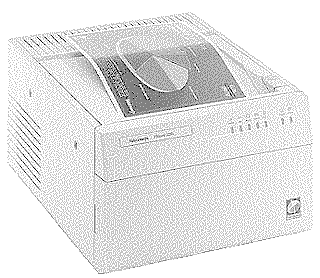
|
Language:
PostScript Level II Speed: 2PPM Method: Color Wax Transfer Graphics: 600x300dpi Autorotation: Yes Duplex: Not Available RET: Not Available |





Internal Fonts (Postscript) Phaser 220i and 220e
| Typeface | Size | Variation | Orientation | Symbol Set |
| Times-Roman | Scalable | Plain | P & L | Adobe PS |
| Scalable | Roman Italic | P & L | Adobe PS | |
| Scalable | Bold | P & L | Adobe PS | |
| Scalable | Bold Italic | P & L | Adobe PS | |
| Courier | Scalable | Plain | P & L | Adobe PS |
| Scalable | Bold | P & L | Adobe PS | |
| Scalable | Oblique | P & L | Adobe PS | |
| Scalable | Bold Oblique | P & L | Adobe PS | |
| Helvetica | Scalable | Plain | P & L | Adobe PS |
| Scalable | Bold | P & L | Adobe PS | |
| Scalable | Oblique | P & L | Adobe PS | |
| Scalable | Bold Oblique | P & L | Adobe PS | |
| Helvetica Narrow | Scalable | Plain | P & L | Adobe PS |
| Scalable | Bold | P & L | Adobe PS | |
| Scalable | Oblique | P & L | Adobe PS | |
| Scalable | Bold Oblique | P & L | Adobe PS | |
| Symbols | Scalable | Plain | P & L | Symbol |
Internal Fonts (Postscript) Phaser 220i standard and 220e with Option 1F
| Typeface | Size | Variation | Orientation | Symbol Set |
| Palatino | Scalable | Roman | P & L | Adobe PS |
| Scalable | Bold | P & L | Adobe PS | |
| Scalable | Italic | P & L | Adobe PS | |
| Scalable | Bold Italic | P & L | Adobe PS | |
| New Century Schoolbook | Scalable | Plain | P & L | Adobe PS |
| Scalable | Italic | P & L | Adobe PS | |
| Scalable | Bold | P & L | Adobe PS | |
| Scalable | Bold Italic | P & L | Adobe PS | |
| ITC Bookman | Scalable | Light | P & L | Adobe PS |
| Scalable | Light Italic | P & L | Adobe PS | |
| Scalable | Demi | P & L | Adobe PS | |
| Scalable | Demi Italic | P & L | Adobe PS | |
| ITC Zapf Chancery | Scalable | Medium Italic | P & L | Adobe PS |
| ITC Avant Garde | Scalable | Book | P & L | Adobe PS |
| Scalable | Demi | P & L | Adobe PS | |
| Scalable | Book Oblique | P & L | Adobe PS | |
| Scalable | Demi Oblique | P & L | Adobe PS | |
| ITC Zapf Dingbats | Scalable | Plain | P & L | Dingbats PS |
Phaser 220e rear panel DIP switches
| SW | Description | Setting | |
| 1 | Reset/run | The printer runs a self-test then proceeds to run normally. Leave the switch down for normal operation. |      |
| The printer resets and does not accept data while the switch is in this position. |  |
||
| 2-3-4 | Serial port, color correction, configuration page | Normal operation, variable serial port, no color correction |     |
| Fixed serial parameters, no color correction |  |
||
| Color correction set to vivid blue, variable serial |  |
||
| Reserved | |
||
| Print Configuration Page |  |
||
| Enable Sample Prints | |
||
| Reserved | |
||
| Reserved | |
Phaser 220i rear panel DIP switches
| SW | Description | Setting | |
| 1 | Reset/run | The printer runs a self-test then proceeds to run normally. Leave the switch down for normal operation. |      |
| The printer resets and does not accept data while the switch is in this position. | |
||
| 2-3-4 | Configuration page/Sample prints | Default, Normal operation | |
| Reserved | |
||
| Reserved | |
||
| Reserved | |
||
| Prints configuration page | |
||
| Enables printing of sample prints at power-up | |
||
| Not Used | |
||
| Not Used | |
||
| 5 | Start Job | The Sys/Start job on the hard disk runs |  |
| The Sys/Start job does not run. |  |
||
| 6 | Not Used |  |
|
| 7 | Baud Rate | Variable. Lets you change the serial communication parameters. The factory setting is 9600 baud, software flagging and ignore parity. |  |
| Fixed. Sets the serial communication parameters to 1200 baud, software flagging and ignore parity. |  |
||
| 8-9 | Color Correction | Default. No color correction. |   |
| SWOP Press. |  |
||
| Vivid Blue |  |
||
| Variable. Vivid blue is the default, but you can change this setting by using files on the Phaser 220 drivers and utilities disks. | |
The interfaces for the TEK-Phaser 220i/E are located on the back side of the printer.
Parallel
Availability: Standard
Connection: High-speed parallel
Activation: Automatic
Serial
Availability: Standard
Connection: RS-232-C serial
Activation: Automatic
AppleTalk
Availability: Standard
Connection: 9 pin AppleTalk/LocalTalk
Activation: Automatic
Ethernet
Availability: Standard on 220i, Optional for 220e
Connection:
Activation: Refer to Network Utilities Guide
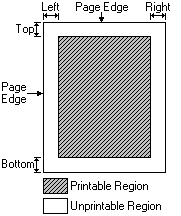
Unprintable Region
| Letter
(non perforated paper) Left: .2 in. Top: .2 in. Right: .2 in. Bottom: .83n. Letter (perforated bottom paper) Left: .2 in. Top: .2 in. Right: .2 in. Bottom: .2 in. |
 |
Continuous Feeding
Standard Trays 2 trays are provided. One for standard size paper and one for perforated paper. The trays can accept with Letter or A-4 size paper.
Letter, 8 1/2" x 11"
A4, 210mm x 297mm
Optional Trays An optional lower cassette which accepts the same paper sizes as the standard trays.
| Indicator | On | Blinking | Off |
| POWER | The Power switch is on. | N/A | The Power switch is off, the printer is unplugged, or the power supply has failed. |
| READY | The printer is ready for operation. | The printer is processing or printing an image. | The printer is not ready, or there is an error. |
| ERROR | The print engine has an error that is not user-correctable. If this indicator lights at any time other than power-up, turn the printer off, wait 30 seconds, then turn it on again. If the indicator lights again, the printer requires service. | The printer's controller board has an error that is not user-correctable. If this indicator lights at any time other than power-up, turn the printer off, wait 30 seconds, then turn it on again. If the indicator lights again, the printer requires service. | Normal operation there are no print engine or controller board errors. |
| JAM | Media is jammed inside the printer. | The printer has failed to pick up the media for a print job. Remove the paper tray and put it back in to clear the error. It may be necessary to clean the paper pick rollers. | Normal operation: there are no media jams. |
| MEDIA | There is no media in the selected tray, or the selected tray is not installed. | The media in the tray is the wrong size for that tray. | Media is ready to feed. |
| COVER | The top cover or the front cover is open. | N/A | Normal operation: The top and front covers are closed. |
| RIBBON | At least 75% of the transfer roll is used up. The printer can make prints with the remainder of the transfer roll. | The transfer roll is used up or not installed. This light will also blink if a non-Tektronix transfer roll is installed. | Normal operation: less than 75% of the transfer roll is used. |